• Music
  • About

RajeshGautam.com

RajeshGautam.com

Category Archives: Technology

Man Shadow on Moon…It appears to be Google Maps Anomaly

13 Wednesday Aug 2014

Posted by RG in Technology

≈ Leave a comment

Tags

Alien man on Moon, Alien man on Moon google maps, Alien man shadow on Moon, google moon man, image of man shadow on moon, man on moon google maps, man on moon with shadow 2014, Man Shadow on Moon, Man Shadow on Moon a google map anomaly, video of man shadow on moon, viral image of man on moon

Few weeks back, news about a shadow on the moon became viral over the internet and everyone was sharing the same on social media.

This was the original image which surfaced on Social Media.
Four locations having the same shadow
View Full Image

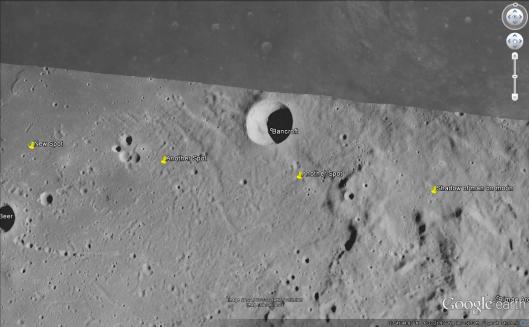
My daughter also got into it and started researching on Google Maps. Initially we could not believe that actually there is a man and shadow of a man like figure but later she researched and found that this may be a dust particle stuck on the camera with which Google Maps were captured. She found a repeated image on the same length. See below and try it yourself.

These are the four locations found Google Earth(Moon) which have the same shadow.

Four locations having the same shadow
View Full Image

If you have Google Earth then open it else install one and select moon maps. Search for the following coordinates.

Latitude 27°28’16.20″N Longitude 4°46’48.09″W

Latitude 27°33’3.57″N Longitude 6° 7’16.74″W

Latitude 27°37’23.62″N Longitude 7°28’24.13″W

Latitude 27°40’45.81″N Longitude 8°48’54.77″W

You can also search for “Bancroft” and view this in Google Earth at elevation of 24 Mi. Then search for these images.

http://www.examiner.com/article/colossus-spotted-on-google-moon-video

Share this:

  • Click to share on Facebook (Opens in new window) Facebook
  • Click to share on X (Opens in new window) X
  • Click to share on Reddit (Opens in new window) Reddit
Like Loading...

Easy Ways to Expose Yourself to the World of Hackers…..

18 Saturday Jan 2014

Posted by RG in Technology

≈ 2 Comments

Tags

Are security cameras at home safe, Facebook security, how to be careful with security issues related to socila network sites, how to secure wifi, simple wifi setup, Why not to stream video to iphone

During the last 30 years, technology had been a big catalyst in changing our lives in many good ways. Now we have many new products, tools and software applications that are part of our daily lives. Technologies like internet and its various wireless forms like 2G, 3G & 4G have really shortened the world by decreasing the communication gap and cost. I remember in 1997 when we used to call home (India) from USA, it used to cost us around $2 per minute and that cost had literally come down to pennies in the last few years. Today many software applications e.g. Facebook, Google, many email services and endless mobile applications to call, SMS and chat are offered free. There may not be any cost attached when we use these tools but there are many security threats attached to them which many of us are not aware of and because of that lack of knowledge we suffer.

Since I have been in the software development business for the last 20 years, I can easily make these two statements:  as soon as you are connected to the internet using any device whether it’s your desktop, tablet or mobile, you are not safe and second, any application, online or software residing on your PC, tablet or mobile device can potentially expose you to hackers.  If there is an extremely intelligent developer/company who claims that their application is completely secure then there is also an extremely smart hacker sitting somewhere to crack that code to misuse it. Most of these cyber-attacks are done intentionally to harm innocent users using internet and World Wide Web. People who named WWW probably had good intentions but literally did not think that “Web” still means: “A network of fine threads constructed by a spider from fluid secreted by its spinnerets, used to catch its prey.” Hackers are spiders and we are their prey.

Using Security Cameras at home: This particular instance had provoked me to write this blog and is a good example of how important it is to really to understand what you are getting into. Few months back, we got security cameras installed in our home. When the installation was about to complete, the installer asked me if I would like to track activity remotely through the web. I had a big smile and my answer was yes because it would be an advantage when we go on vacation, then we could have tracked any activity inside our home, backyard, front gates etc. on the iPhone. But while the guy was setting it up he had asked me to connect the DVR with my local internet and also asked for user id and password. When I asked him why he would need all that information, he had no answer. But, I was still watching him closely and this was what I found. He literally used my user id and password and opened one of the ports which could directly communicate through the servers in Hong Kong and through internet, stream all video activity to that server which further gets downloaded to the iPhone/Mobile app. I don’t think anyone even imagines what these security vendors are doing, but literally any day if hackers hack the server, millions of those users are exposed.

Now there are Wi-Fi security cameras available which are even more insecure. As long as you are securing the place with security cameras and recording the activity, it’s fine. But, as soon as you integrate your IPhone, you would potentially be exposing entire activity to the hackers.

Configuring and using Wi-Fi : Wi-Fi is another technology that everyone is going after. Initially it was meant to connect laptops, desktops, printers and tablets through internet but now the same is being used to control household devices, like switching on the lights, controlling TVs and refrigerators. Many folks by themselves or by installers rush through the job to get their Internet connectivity working as quickly as possible. That’s totally understandable but if the Internet is not configured properly it can cause numerous security problems. Why is security so important and what could possibly go wrong? Here is the list:

Once your Wi-Fi is hacked, hackers can use your account to download/upload movies or any media.

They can surf sites which you may not usually go to.

In some cases they can access your hard disk and that means they can access all your files.

There are many utilities easily available which can hack your Wi-Fi. It’s easy for hackers to look for all open and unsecured Wi-Fi  networks and use them. So why take that risk, at least follow these steps to secure yourself:

Change the name of your SSID and do not make it very attractive and obvious e.g. GAUTAM HOME.

Always use a password or key to connect.

Do not keep password as simple as “1234” or “password”.

Choose encryption type to WEP, if you have other choices available like WPA or WPA2 then it’s better to choose the latter.

Free Emails/SMS/Chat and social networking sites: Nothing is free in this world, anything that you get for no money, means you are definitely compromising something else. When was the last time that you completely read the agreement or terms and conditions when you signed up for the social networking site or signed up for free email service, I guess never. No one has time to go through those agreements. Recently, we were developing a website and we thought that we should have terms and condition on our website equivalent to what Facebook has. Therefore when our team reviewed the Facebook agreement, it was an eye opener and shame to see how we all have really agreed to those terms. On top of it Facebook is still not safe from hackers; every now and then they have a major security lapse. When you search on Google, Google generally tracks what you are searching for and start pushing their advertisements accordingly. I am sure everyone knows that NSA had been tracking all email services and all SMS, now that is for good cause but what if there is a hacker who is as smart as someone sitting in NSA and crack and hack all this information. Recently Snapchat was hacked and 4.5 million users had been exposed. Target and few other major retailers in USA had been hit hard by hackers.

Should you stop using these tools? I say “No”. But you should evaluate the risks of signing up for these services and understand how these new tools or devices are exposing us to the world of hackers. I used to have many friends who would not join any social network site; they would not create a Facebook account for their kids because kids could get spoiled. I had a different point of view, for how long we would be able to control our kids, few years, what happens when they go out of our hands; they would do whatever they would like to do. So why not adapt these things and teach them how to use them, what to do and what not do and also make them aware of these security issues.

Broader idea here is, be aware of these new tools and devices, how they work and what you got to do to secure yourself, because sooner or later you will have to adapt them.


Share this:

  • Click to share on Facebook (Opens in new window) Facebook
  • Click to share on X (Opens in new window) X
  • Click to share on Reddit (Opens in new window) Reddit
Like Loading...

Google Chromecast Availibility in India

14 Saturday Sep 2013

Posted by RG in Technology

≈ 15 Comments

Tags

Does Google Chromecast Works WIth IOS, Does Google Chromecast Works WIth iPad, Does Google Chromecast Works WIth iPhone, Google Chromecast Availibility in India, Google Chromecast Buy, Google Chromecast Buying Options in India, Google Chromecast Launch in India, Google Chromecast Sale, How to buy Google Chromecast in India, How to setup Chromecast on android in India or outside USA, How to setup Chromecast on iOS in India or outside USA

Google had launched a new device called Chromecast, I am sure many of you are already aware of the device but just to summarize this device from google make it easy to stream video from many devices to your high definition TV. Chromecast is a small dongle which gets attached to the HDMI port and through Wi-Fi communicates with any of the supported devices. Chromecast not only works with Android platform but Google Chromecast app is also available for iOS devices like iPhone, iPad and iPod touch users, and will automatically scan for existing local Chromecast devices, as well as allow you to set up a new one to add to your Wi-Fi network. It also lists compatible apps, which for now include both YouTube and Netflix on iOS, from which to broadcast content. Check out many other features at google’s site.

I was hoping that google would introduce this device in India but they have not yet made any announcement. Some folks in India are selling this device from INR 5500 to INR 10,000 taking undue advantage of non-availability of the product. As an alternative I ordered this device from amazon.com and paid only $52, which included delivery and import duties. Amazon global delivery has started delivering to India so it’s easy and reliable to use them.

How to setup Chromecast on iOS in India or outside USA : Since this device officially had not been launched in any country other than USA, am getting tons of questions how to set up the same in India and other countries, please go through the instructions below: Have your friend in USA create an account for you, if that is not an option then you can create a second iTunes account, set country to USA and incase of credit card verification use “None”. You will be able to download all free apps. Refer to the link incase you face any problem setting up the iTunes Account.
http://support.apple.com/kb/HT2534

How to setup Chromecast on android in India or outside USA : Refer to the link below this gentleman had explained it very well, how you can setup and download Chromecast on android devices. http://techneversleeps.com/how-to-setup-chromecast-outside-of-the-u-s/

Share this:

  • Click to share on Facebook (Opens in new window) Facebook
  • Click to share on X (Opens in new window) X
  • Click to share on Reddit (Opens in new window) Reddit
Like Loading...

Where is Adam..from Notion Ink?

14 Tuesday Dec 2010

Posted by RG in Technology

≈ Leave a comment

India has emerged as global IT hub but new ideas, innovation and products for global market are yet to be seen, while I was keen in knowing what is happening in India specially on the innovation side,  I came across this company called Notion Ink. A company started by young kid who had a great vision. NotionInk had made big headlines across the global market. 

They have designed a tablet which will directly compete with tablets like IPAD or Galaxy from Samsung, have more rich features like dual-core Cortex A9 processor and NVIDIA’s Tegra 2 graphics processor. Built-in 8GB of flash storage, a microSD slot, as well as three USB slots (2x full-size USB port and 1x mini-USB), HDMI, and a swiveling 3.2 megapixel camera. I have not yet seen any netbook or tablet in that price range providing HDMI and this could be big selling point for them.

 Product had some setbacks in between and launch had been postponed couple of times but again market timings are a big bet in today’s economy and sometimes desire to be perfect could spoil all the good work.

 Pre-orders on the Adam started last week, but it appeared team was still working on some issues and delivery is committed during January 2011. Company has already sold out Pixel Qi LCD versions of tablet which is definitely boost to their confidence.

I hope these guys are not just targeting Indian market, as the shipping fee from India for the tablet was $50 which is kind of high. These guys might need to figure out how some of the online retailers from Hong Kong have managed to send products to US for less than $10.

I hope this tablet is a big success and if it does then this could trigger another big opportunity of manufacturing and assembling electronic products in India.

Share this:

  • Click to share on Facebook (Opens in new window) Facebook
  • Click to share on X (Opens in new window) X
  • Click to share on Reddit (Opens in new window) Reddit
Like Loading...

Subscribe

  • Entries (RSS)
  • Comments (RSS)

Archives

  • September 2014
  • August 2014
  • June 2014
  • January 2014
  • September 2013
  • December 2012
  • February 2012
  • November 2011
  • July 2011
  • April 2011
  • February 2011
  • December 2010
  • October 2010

Categories

  • Finance
  • Investment
  • Music
  • Opinion
  • Sports
  • Technology
  • Travel
  • Uncategorized

Meta

  • Create account
  • Log in

Create a free website or blog at WordPress.com.

Privacy & Cookies: This site uses cookies. By continuing to use this website, you agree to their use.
To find out more, including how to control cookies, see here: Cookie Policy
  • Subscribe Subscribed
    • RajeshGautam.com
    • Already have a WordPress.com account? Log in now.
    • RajeshGautam.com
    • Subscribe Subscribed
    • Sign up
    • Log in
    • Report this content
    • View site in Reader
    • Manage subscriptions
    • Collapse this bar
%d